Use NeverMetered when Claude Code hits its usage limit
Updated 10 November 2026
When Claude Code stops with a usage-limit message, you either wait for the window to reset or pay for more. A second option is to keep a separate command that runs the same Claude Code on a different backend, and use it for the routine work. This page sets that up in a few minutes. Your normal claude command is never touched.
1. Create an API key
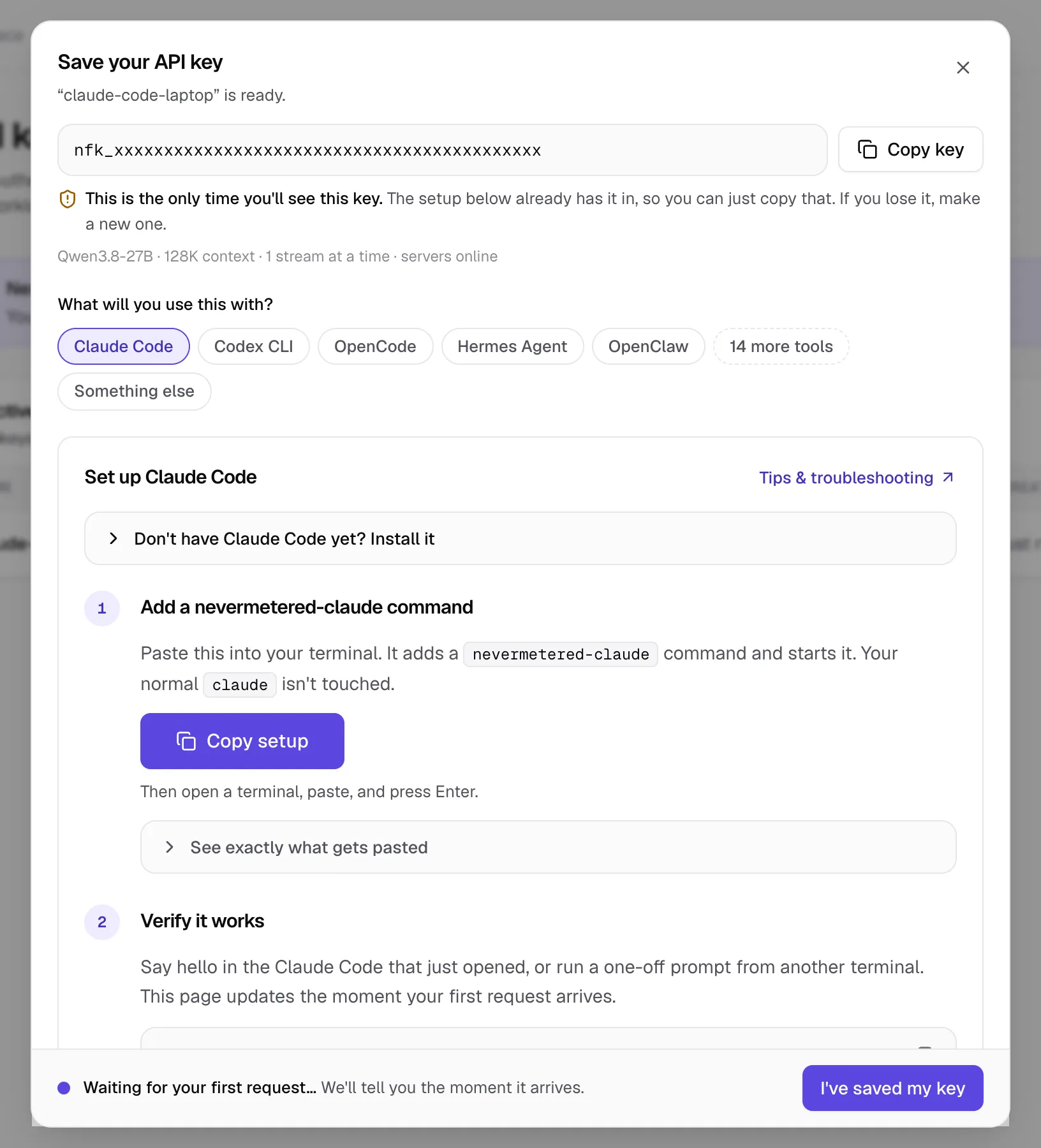
Follow the first-request guide if you haven't made an account yet. In API keys, create a key called something like claude-code-laptop, and keep the dialog open.
2. Install Claude Code (skip if you have it)
Check with claude --version. If you need it, this is Anthropic's own installer:
curl -fsSL https://claude.ai/install.sh | bash3. Add the nevermetered-claude command
In the key dialog, choose Claude Code and press Copy setup: it has your key filled in. The block below is the same command with a placeholder, so you can see exactly what gets pasted. It saves your key in a file only you can read, adds a nevermetered-claude command to your shell, and starts it. Open a new terminal after pasting, then run the command any time.
cat > ~/.nevermetered-claude.sh <<'EOF'
nevermetered-claude() {
  ANTHROPIC_BASE_URL="https://api.nevermetered.com" \
  ANTHROPIC_AUTH_TOKEN="YOUR_API_KEY" \
  ANTHROPIC_MODEL="qwen3.8-27b" \
  ANTHROPIC_DEFAULT_OPUS_MODEL="qwen3.8-27b" \
  ANTHROPIC_DEFAULT_SONNET_MODEL="qwen3.8-27b" \
  ANTHROPIC_DEFAULT_HAIKU_MODEL="qwen3.8-27b" \
  CLAUDE_CODE_SUBAGENT_MODEL="qwen3.8-27b" \
  API_TIMEOUT_MS="600000" \
  CLAUDE_CODE_DISABLE_NONESSENTIAL_TRAFFIC="1" \
  CLAUDE_CODE_MAX_OUTPUT_TOKENS="32000" \
  CLAUDE_CODE_MAX_CONTEXT_TOKENS="131072" \
  claude "$@"
}
EOF
chmod 600 ~/.nevermetered-claude.sh
case "$SHELL" in *zsh) rc=~/.zshrc ;; *) rc=~/.bashrc ;; esac
grep -qsF '.nevermetered-claude.sh' "$rc" || echo '. ~/.nevermetered-claude.sh' >> "$rc"
. ~/.nevermetered-claude.sh
nevermetered-claude
4. Check it works
Ask for one short answer. The request shows up on your Requests page within a few seconds.
nevermetered-claude -p "Reply with the word ready"Switching between the two
| Command | Runs on | Limits you hit |
|---|---|---|
claude | Anthropic, with your Claude plan or API key | Your plan's 5-hour and weekly limits, or your API spend |
nevermetered-claude | NeverMetered, with the key you made | No token quota, 5-hour window or weekly cap. The limit is how many requests run at once, set by your plan |
Requests from nevermetered-claude go to NeverMetered, not Anthropic, so they don't count against your Claude plan. Inside a session, /status shows which base URL and model are in use. If you're ever unsure which one you're in, run it.
What to send where
- Good on NeverMetered: running and fixing tests, large mechanical refactors, writing docs and changelogs, code review passes, and anything you want to leave running for an hour or overnight.
- Keep on your Claude plan: the hard problems, where you want the strongest model reasoning carefully: tricky concurrency bugs, architecture decisions, unfamiliar codebases.
- A common rhythm: plan the change on Claude, then hand the grinding to
nevermetered-claude.
Subagents and parallel work
Each subagent Claude Code starts runs as its own request, so parallel subagents count against your plan's number of parallel streams. Extra requests wait briefly in a queue rather than failing. The parallel streams guide shows how that works and how to see whether you need more.
If something looks off
- Claude Code still talks to Anthropic: You started plain
claude, which is deliberately left alone. Runnevermetered-claudeinstead (open a new terminal first if the command isn't found) and check/status. If you used the terminal-only variables, they only exist in the window you pasted them into. - `model_not_found` naming a `claude-…` model: One of the model variables above is missing, so Claude Code fell back to its own model name. Set all of them, then restart
claude. - `429 concurrency_limit_exceeded`: All your parallel streams are busy and your queue allowance is full. Lower the tool's parallelism (subagents, batch size), or get more streams on your plan.
Seeing "model isn't recognized, context assumed to be 200k"? That's covered in its own guide. Anything else: fix API errors.
Does this change my normal Claude Code?
claude keeps using whatever it used before, so your Anthropic login and plan are unaffected.Does it use up my Claude Pro or Max limits?
Does it work on Windows?
Can I do the same with Codex CLI, OpenCode or Cursor?
- NeverMetered docs: Claude Code setup (checked 10 November 2026)
- NeverMetered pricing and plan limits (checked 10 November 2026)