One API key per project: naming, stream caps and revoking
Updated 10 November 2026
You can use one key for everything, and it will work. But one key per tool, machine or job gives you three things for free: you can see who used what, you can stop one job from starving the others, and you can cut off one thing without breaking the rest.
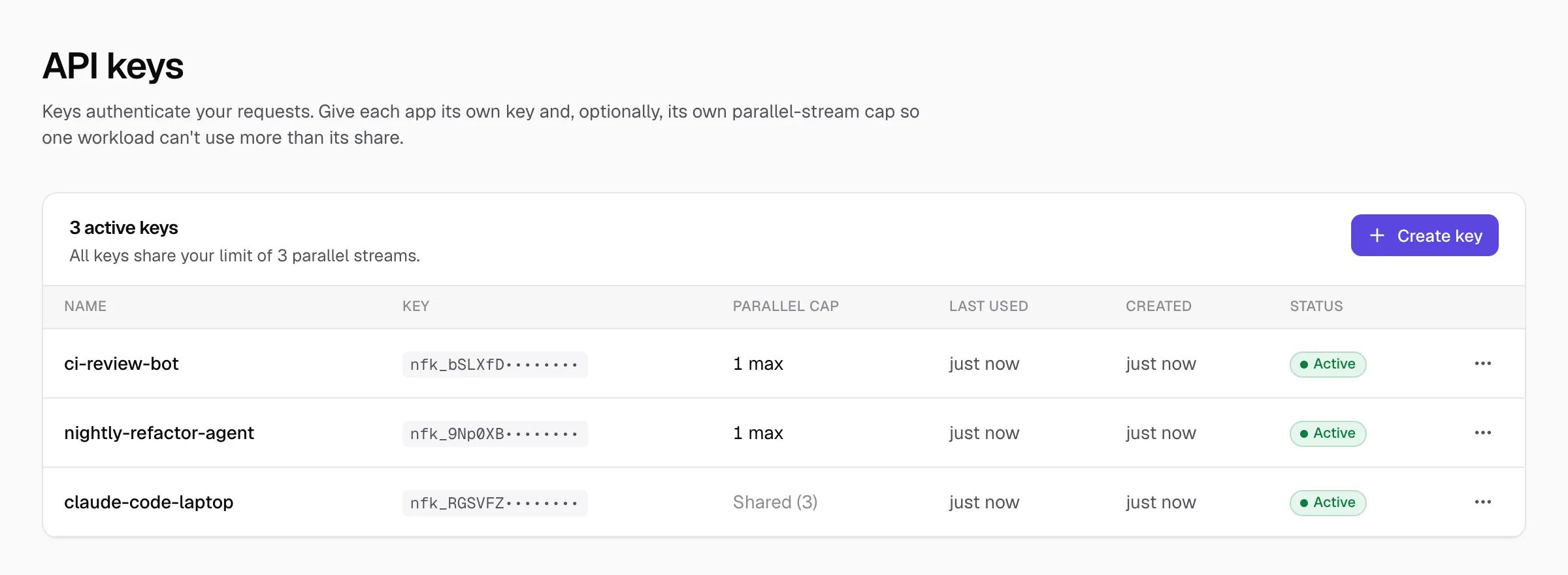
Name keys after where they're used
The name appears everywhere: on the Requests page, in filters and in your exports. Names like claude-code-laptop, nightly-refactor-agent and ci-review-bot answer "which one was that?" months later. key 2 doesn't.
Cap how many requests a key can run at once
All your keys share the plan's parallel streams. A cap lets a key use fewer than the plan's full limit, so one workload can't use more than its share. Open the key dialog's Advanced: limit parallel streams and set Max parallel streams. Leave it blank for the full limit.
| Key | Cap | Why |
|---|---|---|
claude-code-laptop | Shared (the plan's full limit) | Your interactive work should always be able to use every stream it needs |
nightly-refactor-agent | 1 | It can run all night, but never blocks you in the morning |
ci-review-bot | 1 | Reviews can queue behind each other without affecting anything else |
A cap can't be higher than your plan's streams, and it only limits that key: if several caps add up to more than the plan's streams, the plan's limit still applies overall. A key that goes over its own cap gets a 429 with the message "Too many concurrent requests for this API key.", which good tools retry. See how parallel streams work.
Rename a key or change its cap
- 1
Open the key's menu
On API keys, press the three dots at the end of the key's row.
- 2
Choose Rename or set cap
Change the name or the cap and save. The key itself doesn't change, so nothing needs updating in your tools.
Revoke a key
Revoking stops the key working straight away. Use it when a laptop is lost, a key was pasted somewhere it shouldn't have been, or a project ends. There's no undo, so make a new key if you need one again. To replace a key without downtime, create the new one, switch your tool over, check a request arrives, then revoke the old one. Once you have revoked keys, a Show revoked tickbox appears above the list.
How many keys can I have?
Does each key get its own streams?
Can I see which key made a request?
- NeverMetered pricing and plan limits (checked 10 November 2026)